Week 10, Final Reflection

Dear all,

It has been a wonderful course. Though it has been tough and challenging, it leaves me comfortable having gone through diverse unique experiences learning numerous techniques of computer-assisted language learning. Because of the qualitative contributions of you, my dear colleagues, I have learned so much and I am willed to employ the best of practices in my teaching. The discussions and everyone's comments have added value and changed the way I view e-learning forever.

It has taught me how to look at the web-based language learning approaches with an inspecting look and how I could make the most of them. Also, to maximise the benefit for all, I am planning to pass this knowledge to my colleagues. Thanks very much for you all of you from the bottom of my heart.

Best wishes,
Amjad

Week 9, Online Enhancing Learing Tools

Dear all,

Google is setting an outstanding example with tens of globally free web-based applications such as documents, presentations, spreadsheets, and forms. In addition to several types of wiki sites offered by Google, the essential online office suite that requires nothing but the web browser provides the whole educational community with priceless opportunity.

For example, the project wiki template fantastically fit the groups/team work requirements. With information page about the project team, discussion section, time trackers for members, updates, and many customisable to any teacher's needs, there is no doubt that wiki sites cover all the project areas. It also gives the most active members the chance to contribute even more than what is expected from them, freeing them from traditional project/lesson/participation barriers.

I admire Google for coming up with lots of new creative employments of internet technology and making it within the reach of everybody worldwide. Our role should be making the best use of them.

Best wishes,
Amjad

Week 8, Learner Autonomy

Dear all,

Discussing learning autonomy has brought me some pleasant experiences from my high school and college days. As matter of fact, I had instructors preferring traditional lecturing with minimal interactivity during classes. Therefore, I was fully aware that "these methods were not always encouraged by my teachers in the period of learning English!" I have been asking myself what kept me going up learning English with the lack of adequate attention, care, and reinforcement from my instructors? I firmly believe it was the "self-reinforcement," as put forth by Cook, and the pleasure found in "informal collaborative work," as mentioned by Richard Smith in Interconnections, with my classmates/friends.

Providing the learner with the opportunity to work autonomously, in my opinion, resembles more teaching of the language and less about it! The teacher, aiming at encouraging autonomy, may engage the learners in language activities integrating the media: newspapers, radio programmes, TV shows, movies, and music. The exposure to authentic language, in my view point, is inspiring to more digging and explorations. Thus, confidence is reinforced and self-esteem is boosted pushing learning ahead.

Best wishes,
Amjad
Links:

Week 7, Teaching Large Classes

Dear all,

Teaching large classes is one of the most challenging situations many teacher around the world go through every day. I am teaching 30 young learners in each of my four groups and find it extremely difficult to address the needs of every individual in every class. How can I give every student an equal opportunity to learn? How can I follow up the progress of every student on every single activity? How can keep in touch with the students on daily/regular basis? How, how, and how? I have been trying to mix up several solutions to form one comprehensive educational utility. I agree with Dilip and Kazumi "there is no one best solution to use for the problems the teacher face."

However, I have found, through practice, the combination of presentation and assessment features in the PowerPoint that are empowered by VBA extremely time saving. Once the e-lesson designed, the computer relieve the teacher from the heavy burden of correcting, grading, and documenting.Adding up emailing technology, the Outlook used to send the students' data, responses, grades, and whatever the teacher deems important. Moreover, a small database, created by Access, is used to store, analyse, and print the students' data according to the teacher's criteria.In my viewpoint, employing these software form a complete e-learning cycle that is completely free of charge.

Using them in teaching large classes would save a lot of time and allow the teacher to spend the most of time designing new learning experiences, contexts, and situations. Have a look at my blog and check my proposed e-lesson to see exactly what I mean.I admire Jonathan idea that we, teachers, have to maintain, as much as possible, a sense of closeness with our students to guide them through their learning. Through automated, well prepared in advanced, teacher's responses/feedback, the student feel what the teacher's thinks of him and what is really expected to progress more.

What do you think?

Best wishes,
Amjad

Week 6 Echo

Dear Colleagues,

The week's topics and tasks add new facets to my ever going experience. Studying multiple intelligences and learning styles put me a step closer to the students' needs. Once being addressed, careful planning turns them into advantages, Like in Susan Gaer's story. In my situation, where I teach young learners of which most are of bodily/ Kinesthetic style, I am in a continuous pursuit of new equivalents to traditional class TPRs; "Total Physical Response," to work in technology enhanced classes.


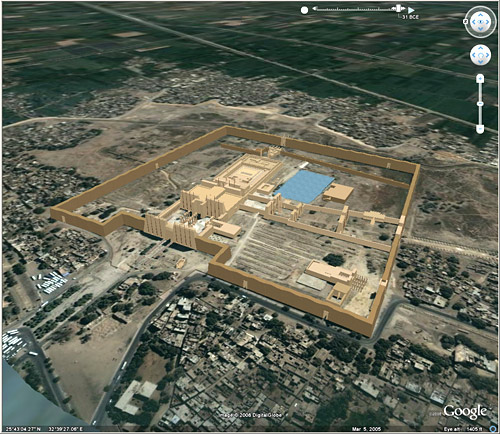
Virtual trips to exotic places around the world are excellent employments that I find extremely exciting. I imagine integrating them into my lesson through creating creative contexts making use of the most recent online technologies. Google Earth can be used to satisfy the bodily/ Kinesthetic learner's eagerness for exploration. The free software not only provides information of maps and measurements, but also, thanks to Earth's forums, it provides lots of photos, videos, and interactive information as well. Incorporating 24/7 international webcams will make language learning a unforgettable experience.

In addition to learning styles, I read with pleasure about engaging all learners in large classes. "Because it is a fact and hard challenge that is unlikely to change in the near future, the teacher needs to be well prepared for taking it up." Mere knowledge is no longer enough to face this situation. Rather than that, students' involvement in the different stages of the lesson is what makes active learning and learners. In addition to saving time shortening lengthy tiring instruction/lecturing time, it helps the student remember and understand much better. A minute paper, mind maps, and thin-pair-share are all creative, collaborative, to the point, and fun ways of involving all learners in class.

Best wishes,
Amjad

Links:
Virutal Trip to Karnak

Powerful Interactive e-Lesson


Dear Marcia, Sandra, and Colleagues,

I am extremely happy to contribute something very special today. I designed an e-lesson that include many powerful features such as automated actions, documentation, and emailing. There are two parts; the presentation and the assessment. The first part is for theory and the second for practise or test. The e-lesson ends by sending emails with the assessment result to the student and the teacher.

To be able to use the emailing and documenting features in my e-lesson, you must do the following:


1. Set up MS Outlook 2007 to work with your Live or Gmail account. Check the tutorials links below. (If your MS Outlook 2007 is already set up and working, skip this step please.)


2. After downloading the rar archive, make sure you extract the folder " Amjad_e-Lesson_Demo " to drive C. It should look like this C:\Amjad_e-Lesson_Demo\


3. Once you open the e-lesson slide show make sure you choose to enable macros. Check this picture.


Tutorials for preparing MS Oultook 2007:

How to set up my Gmail account to work with MS Outlook 2007.
http://mail.google.com/support/bin/answer.py?hl=en&answer=77689

How to set up my Live / Hotmail account to work with MS Outlook 2007.
http://www.freeemailtutorials.com/windowsLiveHotmail/configureHotmailSettingsOptions/hotmailOutlookSettings.php

Resources you may need:

Outlook Connector 12.1 (The latest download right from Microsoft Website)
http://www.microsoft.com/downloads/details.aspx?FamilyID=9A2279B1-DF0A-46E1-AA93-7D4870871ECF&displaylang=en

Winrar Archiver (Download it form the Rar Labs Official Website)
http://www.rarlab.com/


Powerful Interactive e-Lesson Demo


or
From the Course's Wiki
Best wishes,
Amjad

Week 5, an Inspecting Look

Dear Colleagues,

The magical word of this week is WebQuest. I enjoyed exploring the subject of Project-based Learning in depth. I read, along investigating several other web pages, Susan Gaer's paper, Less Teaching and More Learning, and what a journey it was. She unveils the secrets of two astonishing experiences in which PBL was employed. The first with Southeast Asians and the second with mixed group of learner who spoke English, Spanish and Vietnamese. Although she started as traditional teacher using grammar-based curriculum, this did not stop her from changing her methodologies for the sake of providing her students with more meaningful learning.

What I find amazing about her experience with different ethnicities is how she transformed the learners' needs into the most stimulating part of the whole language learning process. The Lao, Hmong Mien, and Lahu learners were keen on conserving their own cultures traits. Thus, Gaer turned this from a need to a deed. Working on folktales, the Southeast Asian learners found meaning and encouragement in what they were doing. The PBL was used intelligently to serve as means to language learning in the most possible exciting way. The resources were used to build new visual dimension to the folktales that were told in an oral-aural approach.

I love the stages and employments of the resources at hand to enrich learning in both of Gaer experiences told in her paper. The shift from the role of mere instructing to that of active facilitating frees the teacher and allows him to go for qualitative opportunities such as creatively designed WebQuests and Treasure Hunts that engage the leaner in the joyful adventure of language learning. I am inspired to create a WebQuest in which my young learners' needs are used to motivate, encourage, and stimulate. Thus, giving meaning to learning.

How about you?

Best wishes,
Amjad

Links:
Less Teaching and More Learning
http://www.ncsall.net/?id=385

Week 4 Takeaway!

Dear colleagues,

During this week, I read about uses of the internet in teaching/learning writing skill. "Authentic materials offered in the WWW paves the way for natural language learning." Jarek Krajka offers a lot of activities with "internet component" in his paper: "Using the Internet in ESL Writing Instruction." However, being written 10 years ago, specifically in the year 2000, means that fundamental changes has taken place replacing old methods and approaches.

I believe there are lots of new and fresh uses of the internet in teaching writing that deserve allocating time to be studied. For my point of view, I see e-learning by all means a practice that embodies the idiom: "actions speak louder than words."

What I find very exciting is the discussion about the issues related to e-learning. For example, I am interested in tracking the progress of students in language learning. As most of the e-lessons created by MS PowerPoint are one-dimensional, when it comes to tracking, the teacher's risk losing his efforts!

I believe in the necessity for the e-lesson to be equipped with the features of logging the student's actions/behaviours and sending them, the logs, by email to the teacher. These logs should have useful information such as when the student opened the e-lesson, what his score is, how many times he tried, and other statistics that show his effort and progress. Also, automated or automatic correction and grading to the electronic exercises, assessments, quizzes and tests is another vital feature. Such e-lesson would be perfect since they relieve the teacher from the burden of corrections/ grading and will allow him to focus on more important aspects of the educational process. Only then we would feel the true use of the computer in language teaching.

My to-do list for this week will be to prepare an e-lesson template with the progress tracking feature.

What do you think?

I am looking forward to hearing from you,
Amjad

Week 3 on the Scales

Dear all,

It has been another interesting week, this time with aural/oral focus. The Dennie Hoopinggarner's paper, Best Practices in Technology and Language Teaching, was my first stop. I learned about how many researchers have been investigating the cause of using the computer in teaching listening and speaking. Many have shown empirical evidence that CALL is a powerful means to improve the target skills.

I have been exploring websites offering new approaches to teaching/practising speaking. The one I find most useful is Randall's ESL Cyber Listening Lab. It provides tens of common contexts the learner could find him/herself in anytime. You can use the activities as listening, speaking, or listening-speaking exercises, with minimal adaptation required on your part. The content of this CALL application can be transformed, also, into paper material for additional/later use. Moreover, it will beautifully enrich the learning envoriment and open the door for students to practise in and out the classroom.

The idea of Levy and Stockwell mentioned in Hoopinggarner's paper caught my interest. It indicates that "speech recognition software and signal analysis software that evaluates learners’ pronunciation have been shown to be an effective way to improve pronunciation and discourse intonation (Levy and Stockwell 2006)." What I would like to study about more is the integration of speech recognition software in teaching/assessing oral skills. I have got some questions that I am going to try find answers to:

How does speech recognition software analyse and grade the learner's verbal production?
How easy is it to be integrated in teaching and learning aural-oral skills?
What do the teacher and the leaner need to start using it?
Are there free web tools that offer this kind of software?

Best wishes,
Amjad

Links:
Randall's ESL Cyber Listening Lab
http://www.esl-lab.com/

Reflecting on Week 2

Dear All,

It has been a tough week! Oxford Teachers' Academy course, Quality Assurance Association and end of term exams made the perfect mixture to one of the hardest weeks of the year so far. Besides having a teacher training course from OTA, my school was on QAA schedule and I had numerous duties to do. I could not have time to be online as usual. Thanks goodness that is over now.

Reflecting on Week 2, I really love the discussion on the web searching tools. NoodleTools website offers a variety of search engines that are tailored to both of the teacher's and the learner's needs. For the first time, I experienced trying specific search engines other than the general Google. I know now why as my colleague Farah said "we were wasting long hours in vain" searching tens if not hundreds of Google pages. I believe it is because Google all the websites cached with no real specification to the target term(s). From now on, I will always try specialised searchers to save time and effort. I want to an expert in web searching, nothing less.

As a matter of fact, the Audience Behaviour Condition Degree of mastery approach is another excellent topic we have had for this week. Writing your lesson objectives in a clear organised precise way help you and your students to play your roles as best as possible. Personally, I believe and an ABCD objective sums up all the process and is very helpful to measuring the learner's achievement. Though it needs studying and habit formation to maximise it benefits, it worths all the efforts to be contributed. I would like to thank all the colleagues for their posts and comments on this week's topics. I learned a lot from you!

Best wishes,
Amjad

Links:
NoodleTools
http://www.noodletools.com/debbie/literacies/information/5locate/adviceengine.html

Minds Collaboration

Dear Colleagues,

Most of us, if not all, are familiar with mind maps. I remember my first-time spider web map that I used for a college composition course. I must admit using this approach has made writing essays easier for me. Therefore, I've been using mind maps for almost everything ever since. As matter of fact, I've been using it for planning, organising, and even meditating. Based on my experience, I believe mind mapping approach is a powerful tool to diagram what you've learned about a specific item and spot the missing gaps precisely. Thus, you know exactly what you have and what you don't.

I've been searching for a web tool to draw mind maps. To my surprise, I found lots of websites offering web-based mind mapping. Some are free and some are not. Therefore, I made a shortlist of and begun trying them one by one checking their features and potentials. Luckily, I found a really wonderful full cream mind mapper. It's Mind42. Does the name imply anything to you?

As a matter of fact, it inspired me to the idea of collaboration of many minds to create one map. In our situation, I suggest that everyone of us should make a mind map of his/her own diagramming own unique experiences, ideas, and findings on each week's task as well as discussion topic. Let's share our mind maps at our blog, as a start. I believe it will add a lot to each blog. Moreover, imagine that we can also collaborate on producing one map together! We can share one or more mind maps through Mind42 and add our fingerprints to them. I'm doubtless that the collaboration of the beautiful minds of such distinguished professionals like you will ultimately produce a rich and unique content.
What do you think?

If you do or don't agree, I'd love to read your highly valued comments.

My best wishes,
Amjad

Links:
Mind42
Wikipedia
NovaMind.com

Creative Web Tools

Dear Colleagues,

I've been thinking over the past my next days what am I going to wirte in my next post? After restless search for long black hours skimming and reading tens of webpages I found true treasure. Now I know what I'm going to write about, I'd love to share with you three mines of gold. They'll make us wealthy and rich in blogging.
Have you ever thought about your students' technical and computer/internet-related needs? Do you feel bitter over the difficulty to get the help of IT Lab guys in your institue to help the students who lack basics of computer literacy? Do you wish to train your students how to use your blog?

You needn't be worried any more! You don't need a super power but only Screencast-O-Matic. It is an easy web tool that enables you of creating video tutorials. You can record your screen and upload the video for free hosting all from your browser with no need to install any software. Fantastic and Free!
Another wonderful web tool is VoiceThread. If you'd like your students to do speaking activities, one amazing thing is to talk about their favourite subject using your target grammatical item. For example, they can work indivudlaly or in groups on projects about holiday photos, new movies' trailers, or chosen articles from newspapers. It is simple and takes only a minute to get used to it.
The last web tool for today is the KidsSpace story builder. It ca be used to create or improvise a story using the website library of images, scenes, and characters. The website is very user-friendly. It takes you right to the author seat and what you've got to do is to pick your favourite characters/setting and let go your imgination. I believe, using it with young leaners will encourage them to express their own feeling, ideas and emotions. Creativity. therefore, is reinforced. I wish you will like these three web tools and use them in your ELT and blogging.

What do you think?
What uses/employments have come to your mind so far?

My best wishes,
Amjad

URL:
Screencast-O-Matic
http://www.screencast-o-matic.com/
VoiceThread
http://voicethread.com/#home
KidsSpace
http://kidsspace.torontopubliclibrary.ca/story.html

Links found in:
Daniela Munca ESL Class Blog

http://dvmunca.blogspot.com/

Academic Blogging Experience

Welcome to my blog!

It is an honour to have you, dear colleagues, here reading my first post. Though I am not entirely new to blogging, this is my first time to write about my own experiences, especially academic or e-learning related ones. It is such a wonderful thing to have my own ideas, thoughts and opinions up for the world. Getting feedback from readers is another fantastic feature that makes me feel better about my posts. From now on, I will be posting regularly, hopefully on daily basis.

The beauty of blogging is the "Contribution" of your most successful experiences. That means you are no longer a consumer, but rather an active professional. I highly value your responses as I believe your feedback and comments are essential for the success of my blog. Please feel free to do so and contact me if you like anything on my blog that you wish to have on yours. It is my pleasure to teach you how to do that.

Accept my best wishes,

Amjad
 

Design in CSS by TemplateWorld and sponsored by SmashingMagazine
Blogger Template created by Deluxe Templates