Week 6 Echo

Dear Colleagues,

The week's topics and tasks add new facets to my ever going experience. Studying multiple intelligences and learning styles put me a step closer to the students' needs. Once being addressed, careful planning turns them into advantages, Like in Susan Gaer's story. In my situation, where I teach young learners of which most are of bodily/ Kinesthetic style, I am in a continuous pursuit of new equivalents to traditional class TPRs; "Total Physical Response," to work in technology enhanced classes.
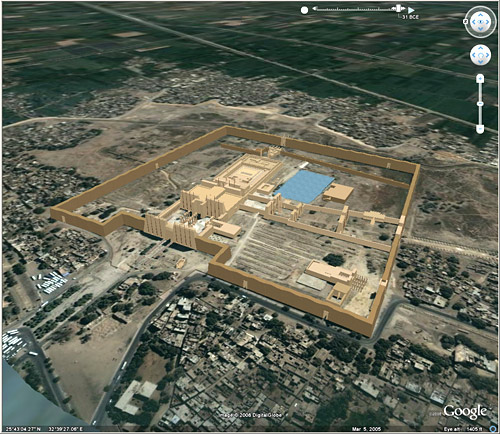

Virtual trips to exotic places around the world are excellent employments that I find extremely exciting. I imagine integrating them into my lesson through creating creative contexts making use of the most recent online technologies. Google Earth can be used to satisfy the bodily/ Kinesthetic learner's eagerness for exploration. The free software not only provides information of maps and measurements, but also, thanks to Earth's forums, it provides lots of photos, videos, and interactive information as well. Incorporating 24/7 international webcams will make language learning a unforgettable experience.

In addition to learning styles, I read with pleasure about engaging all learners in large classes. "Because it is a fact and hard challenge that is unlikely to change in the near future, the teacher needs to be well prepared for taking it up." Mere knowledge is no longer enough to face this situation. Rather than that, students' involvement in the different stages of the lesson is what makes active learning and learners. In addition to saving time shortening lengthy tiring instruction/lecturing time, it helps the student remember and understand much better. A minute paper, mind maps, and thin-pair-share are all creative, collaborative, to the point, and fun ways of involving all learners in class.

Best wishes,
Amjad

Links:
Virutal Trip to Karnak

Powerful Interactive e-Lesson


Dear Marcia, Sandra, and Colleagues,

I am extremely happy to contribute something very special today. I designed an e-lesson that include many powerful features such as automated actions, documentation, and emailing. There are two parts; the presentation and the assessment. The first part is for theory and the second for practise or test. The e-lesson ends by sending emails with the assessment result to the student and the teacher.

To be able to use the emailing and documenting features in my e-lesson, you must do the following:


1. Set up MS Outlook 2007 to work with your Live or Gmail account. Check the tutorials links below. (If your MS Outlook 2007 is already set up and working, skip this step please.)


2. After downloading the rar archive, make sure you extract the folder " Amjad_e-Lesson_Demo " to drive C. It should look like this C:\Amjad_e-Lesson_Demo\


3. Once you open the e-lesson slide show make sure you choose to enable macros. Check this picture.


Tutorials for preparing MS Oultook 2007:

How to set up my Gmail account to work with MS Outlook 2007.
http://mail.google.com/support/bin/answer.py?hl=en&answer=77689

How to set up my Live / Hotmail account to work with MS Outlook 2007.
http://www.freeemailtutorials.com/windowsLiveHotmail/configureHotmailSettingsOptions/hotmailOutlookSettings.php

Resources you may need:

Outlook Connector 12.1 (The latest download right from Microsoft Website)
http://www.microsoft.com/downloads/details.aspx?FamilyID=9A2279B1-DF0A-46E1-AA93-7D4870871ECF&displaylang=en

Winrar Archiver (Download it form the Rar Labs Official Website)
http://www.rarlab.com/


Powerful Interactive e-Lesson Demo


or
From the Course's Wiki
Best wishes,
Amjad

Week 5, an Inspecting Look

Dear Colleagues,

The magical word of this week is WebQuest. I enjoyed exploring the subject of Project-based Learning in depth. I read, along investigating several other web pages, Susan Gaer's paper, Less Teaching and More Learning, and what a journey it was. She unveils the secrets of two astonishing experiences in which PBL was employed. The first with Southeast Asians and the second with mixed group of learner who spoke English, Spanish and Vietnamese. Although she started as traditional teacher using grammar-based curriculum, this did not stop her from changing her methodologies for the sake of providing her students with more meaningful learning.

What I find amazing about her experience with different ethnicities is how she transformed the learners' needs into the most stimulating part of the whole language learning process. The Lao, Hmong Mien, and Lahu learners were keen on conserving their own cultures traits. Thus, Gaer turned this from a need to a deed. Working on folktales, the Southeast Asian learners found meaning and encouragement in what they were doing. The PBL was used intelligently to serve as means to language learning in the most possible exciting way. The resources were used to build new visual dimension to the folktales that were told in an oral-aural approach.

I love the stages and employments of the resources at hand to enrich learning in both of Gaer experiences told in her paper. The shift from the role of mere instructing to that of active facilitating frees the teacher and allows him to go for qualitative opportunities such as creatively designed WebQuests and Treasure Hunts that engage the leaner in the joyful adventure of language learning. I am inspired to create a WebQuest in which my young learners' needs are used to motivate, encourage, and stimulate. Thus, giving meaning to learning.

How about you?

Best wishes,
Amjad

Links:
Less Teaching and More Learning
http://www.ncsall.net/?id=385

Week 4 Takeaway!

Dear colleagues,

During this week, I read about uses of the internet in teaching/learning writing skill. "Authentic materials offered in the WWW paves the way for natural language learning." Jarek Krajka offers a lot of activities with "internet component" in his paper: "Using the Internet in ESL Writing Instruction." However, being written 10 years ago, specifically in the year 2000, means that fundamental changes has taken place replacing old methods and approaches.

I believe there are lots of new and fresh uses of the internet in teaching writing that deserve allocating time to be studied. For my point of view, I see e-learning by all means a practice that embodies the idiom: "actions speak louder than words."

What I find very exciting is the discussion about the issues related to e-learning. For example, I am interested in tracking the progress of students in language learning. As most of the e-lessons created by MS PowerPoint are one-dimensional, when it comes to tracking, the teacher's risk losing his efforts!

I believe in the necessity for the e-lesson to be equipped with the features of logging the student's actions/behaviours and sending them, the logs, by email to the teacher. These logs should have useful information such as when the student opened the e-lesson, what his score is, how many times he tried, and other statistics that show his effort and progress. Also, automated or automatic correction and grading to the electronic exercises, assessments, quizzes and tests is another vital feature. Such e-lesson would be perfect since they relieve the teacher from the burden of corrections/ grading and will allow him to focus on more important aspects of the educational process. Only then we would feel the true use of the computer in language teaching.

My to-do list for this week will be to prepare an e-lesson template with the progress tracking feature.

What do you think?

I am looking forward to hearing from you,
Amjad

Week 3 on the Scales

Dear all,

It has been another interesting week, this time with aural/oral focus. The Dennie Hoopinggarner's paper, Best Practices in Technology and Language Teaching, was my first stop. I learned about how many researchers have been investigating the cause of using the computer in teaching listening and speaking. Many have shown empirical evidence that CALL is a powerful means to improve the target skills.

I have been exploring websites offering new approaches to teaching/practising speaking. The one I find most useful is Randall's ESL Cyber Listening Lab. It provides tens of common contexts the learner could find him/herself in anytime. You can use the activities as listening, speaking, or listening-speaking exercises, with minimal adaptation required on your part. The content of this CALL application can be transformed, also, into paper material for additional/later use. Moreover, it will beautifully enrich the learning envoriment and open the door for students to practise in and out the classroom.

The idea of Levy and Stockwell mentioned in Hoopinggarner's paper caught my interest. It indicates that "speech recognition software and signal analysis software that evaluates learners’ pronunciation have been shown to be an effective way to improve pronunciation and discourse intonation (Levy and Stockwell 2006)." What I would like to study about more is the integration of speech recognition software in teaching/assessing oral skills. I have got some questions that I am going to try find answers to:

How does speech recognition software analyse and grade the learner's verbal production?
How easy is it to be integrated in teaching and learning aural-oral skills?
What do the teacher and the leaner need to start using it?
Are there free web tools that offer this kind of software?

Best wishes,
Amjad

Links:
Randall's ESL Cyber Listening Lab
http://www.esl-lab.com/
 

Design in CSS by TemplateWorld and sponsored by SmashingMagazine
Blogger Template created by Deluxe Templates